


WLS Phone Instructions

Sep 29, 2025
 273
273
How to check WLS Voicemail from home:
- Call 216-916-1911
- Press 6
- It will say "Comedian mail, mailbox" and wait for you to enter your extension
- Enter your extension
(no # or extra characters required) - Enter your password
(no # or extra characters required)
Full Voicemail Menu Tree:
1) new messages
2) change folders
3) advanced options
5) leave a message
* return to main menu
0) mailbox options
1) record unavailable message
2) record busy message
3) record your name
4) record your temporary greeting
5) change password
* return to main menu
* for help
# to exit
Forwarding your phone remotely:
- While on the WLS network (TS10/TS11), go to the User Control Panel here:
https://pbx.wlsstamping.com/ucp/ - Your username is your 4-digit extension.
- If you do not have a password set up for this page, contact [email protected] to request one.
- The first time that you log in, this page will be blank. Ask help desk to "create your Dashboard and add your Widgets"
- You can now use the Dashboard to enable/disable call forwarding.
Enabling Call forwarding:
- Toggle this option off (it is on) and toggle it back on
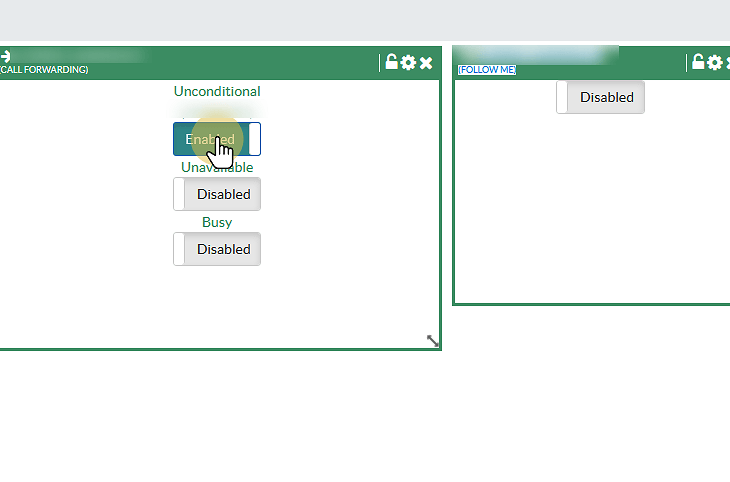
2. Enter the phone number you would like to forward to

3. Click "Save"


